


The work I’m doing right now involves designing screens that respond to different API states, and each error code, failure mode, and edge case maps to a distinct user journey. Different errors need different messaging. Different failure modes need different recovery paths.
The work has me categorising API responses on sticky notes, grouping error codes by what they mean for the person using the product rather than what went wrong technically. It’s design work, but it feels more like studying a contract. What does this system promise? What does it demand? What happens when things go wrong?
And the more I read through API documentation from companies like Stripe, GitHub, and Twilio, the more I notice a pattern. These teams have spent decades solving problems that design systems are still fumbling with: Predictable behaviour under uncertain conditions, graceful error handling, versioning without breaking consumers. We keep reinventing these wheels, and we’re building worse versions.
I’ve written before about treating your component architecture like an API with clear contracts and explicit inputs, but I want to go deeper than the metaphor. I want to steal specific patterns from API documentation and show how they translate directly into component architecture decisions.
Idempotency isn’t just for payments
Stripe’s API documentation includes a concept that changed how I think about component design. An idempotent operation is one that produces the same result regardless of how many times you execute it. Call it once, call it five times, you get the same outcome.
Here’s how Stripe implements it. When you make a POST request to create a charge, you include an Idempotency-Key header with a unique value. If your network drops and you retry the request with the same key, Stripe recognises it as a duplicate and returns the original response instead of creating a second charge. No double billing. No confused state.
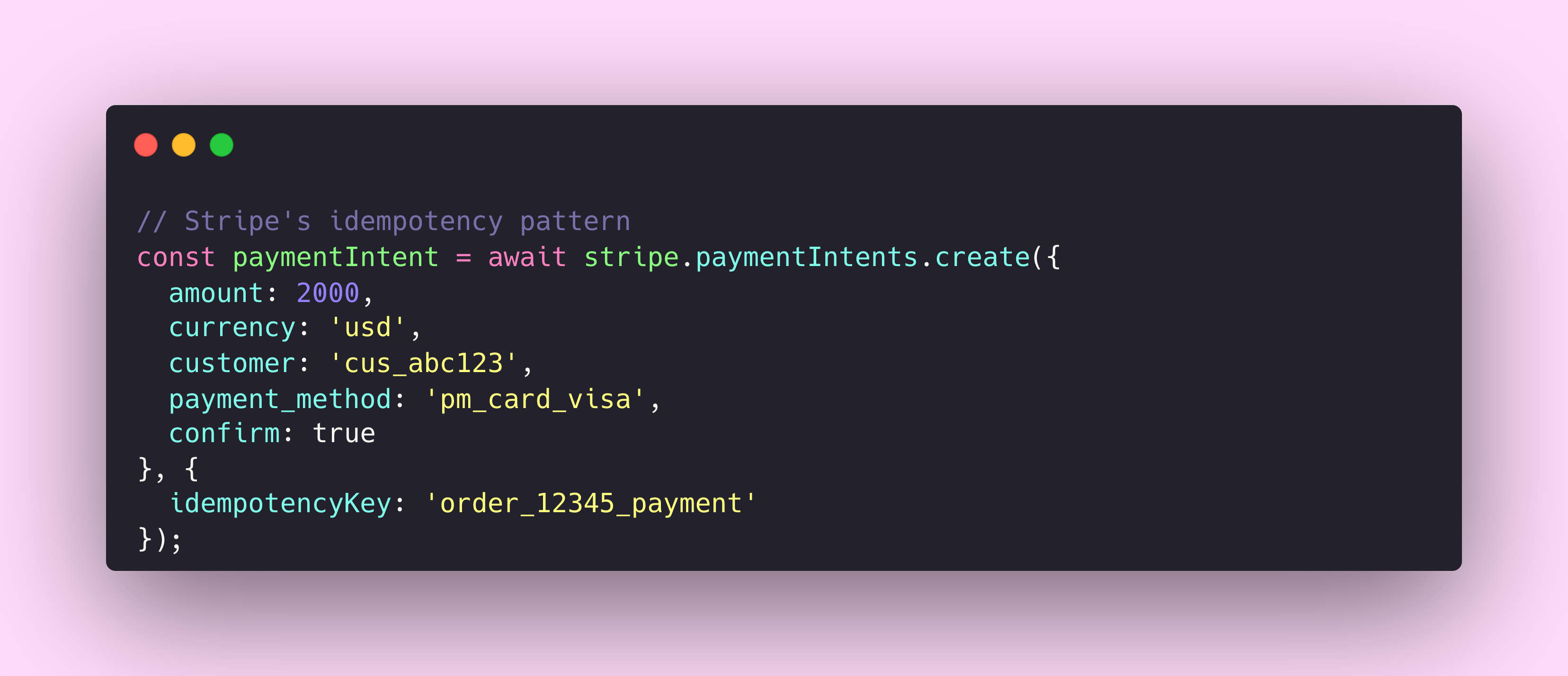
Now think about your submit button component. What happens when a user clicks it twice in rapid succession? What happens when the network is slow and they click again because nothing seemed to happen? Most form implementations create duplicate submissions, duplicate API calls, duplicate database entries.
The component equivalent of idempotency looks something like this. Your button needs to track its own submission state and reject duplicate invocations until the current operation completes. It’s not true idempotency in the API sense, where the server returns the same result for duplicate requests. Instead, it’s duplicate prevention at the source. The end result is similar, but the mechanism is different.
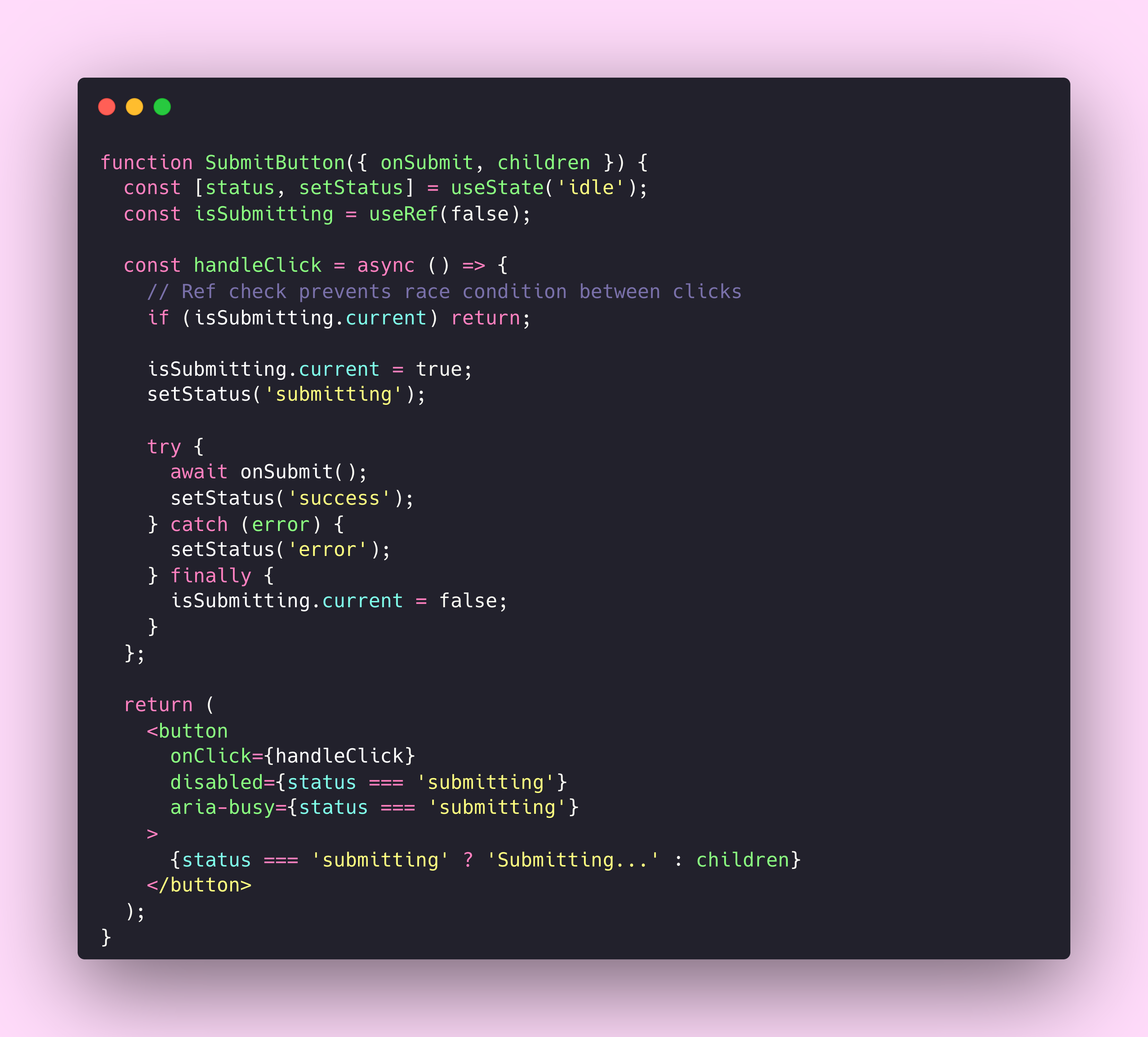
This pattern isn’t complicated. But I’ve audited dozens of design systems, and most button components don’t include this protection by default. They leave it to consuming teams to implement their own safeguards, which means it often doesn’t happen at all.
Stripe’s documentation on idempotent requests goes further. They explain that idempotency keys expire after 24 hours, that the system compares incoming parameters to the original request and errors if they don’t match, and that GET and DELETE requests are inherently idempotent so you don’t need to add keys. Every edge case is documented.
Your component documentation should answer similar questions. What happens if the same action is triggered twice? What state does the component return to after an error? Can consumers safely retry failed operations?
Error handling as a first-class contract
GitHub’s REST API returns errors in a structured format that tells you exactly what went wrong and how to fix it.
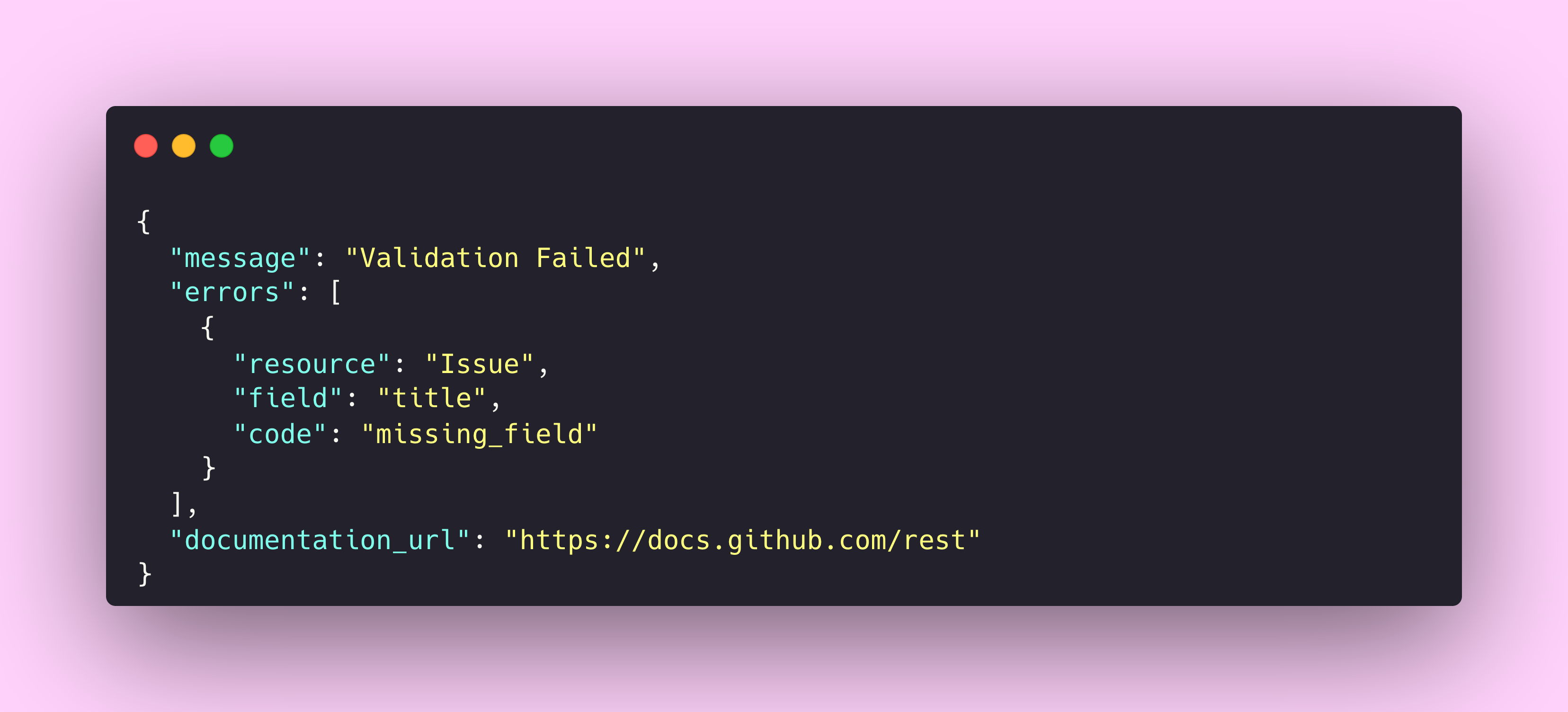
Every error includes a resource property identifying what type of thing failed, a field property pointing to the specific problem area, and a code property with a machine-readable error type. The GitHub API troubleshooting documentation lists every possible error code and what to do about each one.
Compare this to most component error states. A form field turns red. Maybe the word “Error” appears. Perhaps there’s a generic message like “Something went wrong”. The user is left guessing, and the developer consuming the component has no programmatic way to respond appropriately.
I’ve found that the most effective error handling in components follows the same structure as API errors. The component should communicate what failed, which specific element or input caused the failure, what type of error occurred, and what the user or developer can do about it.
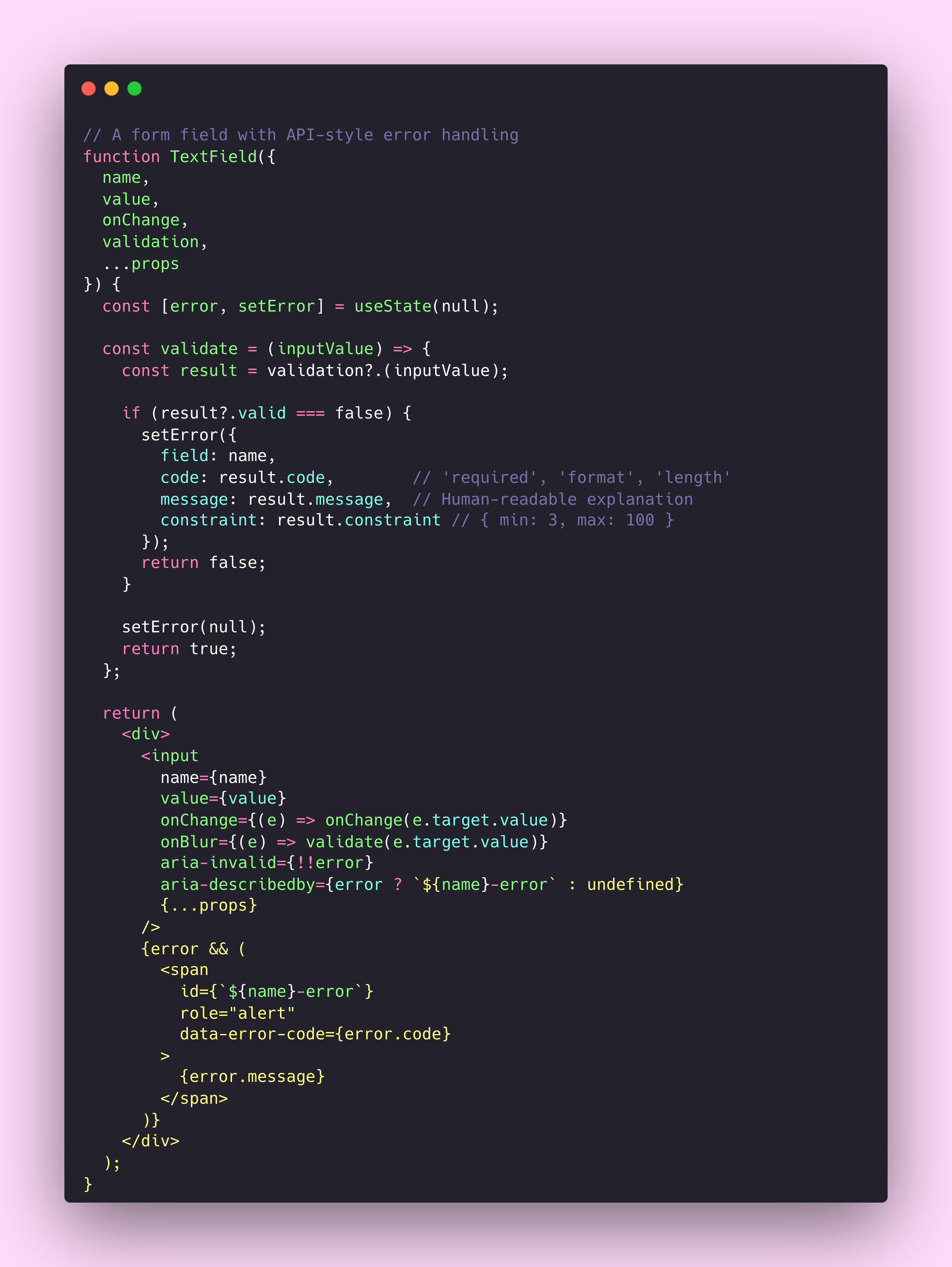
The data-error-code attribute might seem like overkill, but it gives consuming applications a way to respond programmatically to specific error types. They can show different help text for a required error versus a format error. They can track which validation errors occur most frequently. They can build custom error recovery flows.
This is what Tom Greever talks about in Articulating Design Decisions when he emphasises the importance of explaining the “why” behind design choices. Error states carry meaning, and meaning requires structure.
Versioning without breaking the world
API teams have been managing breaking changes for decades. They’ve developed sophisticated strategies because the cost of getting it wrong is immediate and measurable. Break your API, and your customers’ applications stop working. Their phones ring. Their revenue drops.
Design systems often lack this feedback pressure. When you change a component’s prop from type="primary" to variant="primary", the breakage is diffuse. Teams discover it during their next deploy, or worse, months later when someone updates dependencies. By then, the connection between cause and effect has dissolved.
The Microsoft Azure API design guidelines describe three common versioning strategies. URI versioning puts the version number in the path, like /v1/users and /v2/users. Header versioning keeps the URI clean but requires clients to set a version header on every request. Query parameter versioning appends version information to the URL, like /users?version=2.
Most design systems adopt something closer to URI versioning through package management. Version 1.x of your component library exports one API, version 2.x exports another. But this forces an all-or-nothing upgrade. You can’t use the new Button while keeping the old Modal.
Twilio’s Paste design system takes a more granular approach. Individual components can be updated independently without requiring a full library upgrade. IBM’s Carbon design system publishes detailed deprecation schedules and migration guides, giving teams months of warning before removing functionality.
The pattern I’ve seen work best borrows from API deprecation headers. In REST APIs, you might see a response header like this.
Sunset: Tue, 31 Dec 2024 23:59:59 GMT
Link: </v2/users>; rel="successor-version"
The equivalent in a component library is a deprecation warning that fires at development time with clear guidance on what to use instead.
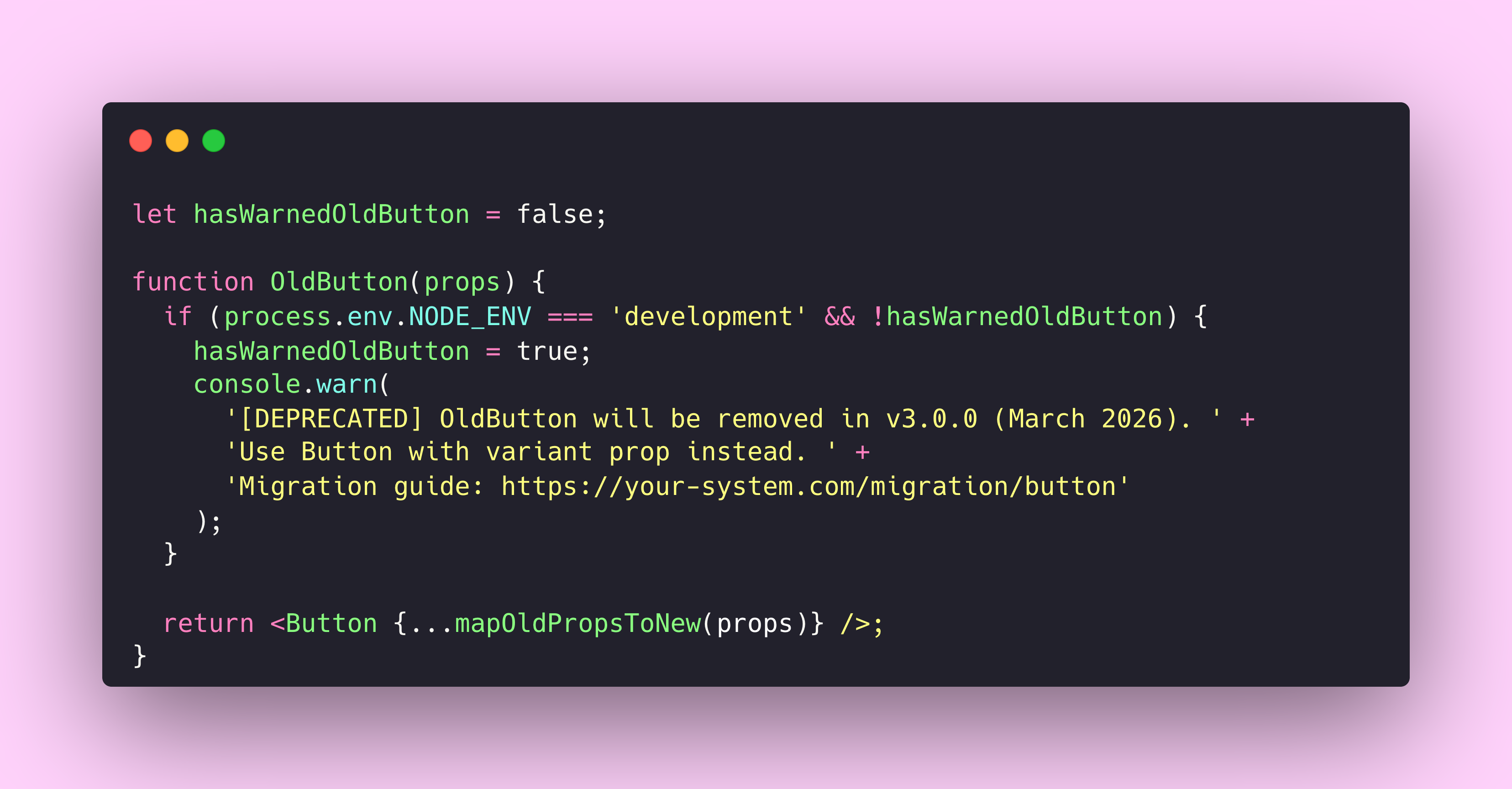
This approach maintains backward compatibility while actively guiding teams toward the new pattern. The old component becomes a thin wrapper around the new one, ensuring consistent behaviour during the transition period.
I’ve written about the political realities of component retirement before. The technical patterns matter, but so does giving teams enough runway to plan migrations. A deprecation warning that fires six months before removal is useful. One that fires two weeks out is hostile.

Is your design system ready for AI? AI agents are already consuming design systems. Find out if yours is structured to be understood by them.
Rate limiting for your render cycle
API rate limiting exists to protect servers from being overwhelmed. When you hit the limit, you get back a 429 Too Many Requests response with headers telling you exactly when you can try again.
HTTP/1.1 429 Too Many Requests
Retry-After: 60
X-RateLimit-Limit: 100
X-RateLimit-Remaining: 0
X-RateLimit-Reset: 1691172000
The IETF draft specification for RateLimit headers standardises this pattern across the industry. Clients can inspect these headers proactively and slow down before hitting the limit entirely.
Components face a similar problem with render performance. Scroll events can fire 100 times per second. Keystroke events during fast typing come in bursts. Window resize events flood in during a drag operation. Without protection, each event triggers a state update, each state update triggers a re-render, and your application grinds to a halt.
Debounce and throttle are the component equivalents of rate limiting. Debounce waits until a burst of activity stops before executing, which makes it perfect for search inputs where you only care about the final query. Throttle ensures execution happens at most once per interval, which works better for scroll handlers where you need periodic updates during continuous activity.
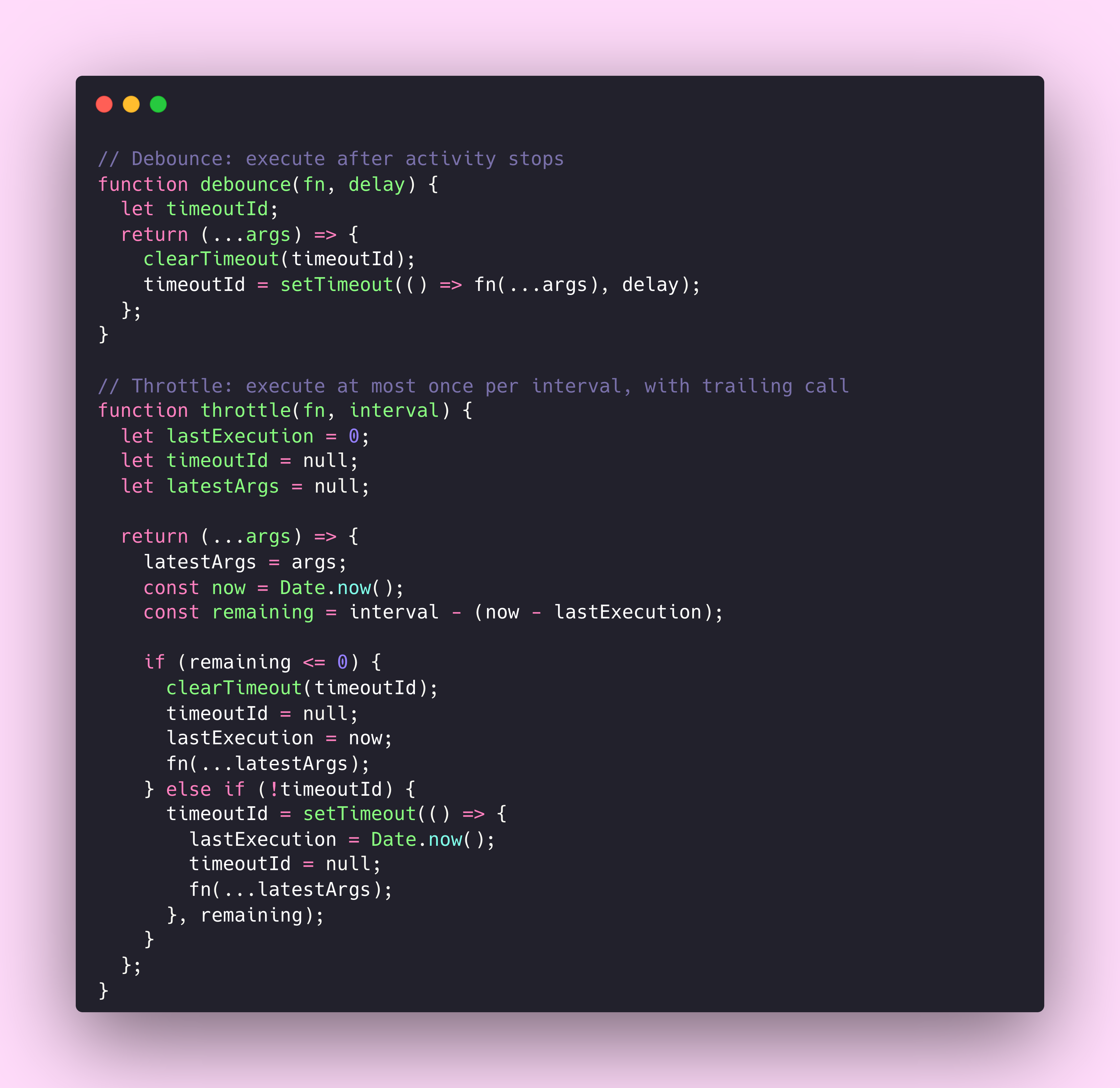
The parallel to API rate limiting goes deeper than the mechanism. Good APIs communicate their limits through headers so clients can adapt. Good components should communicate their performance characteristics through documentation and, where possible, through the API itself.
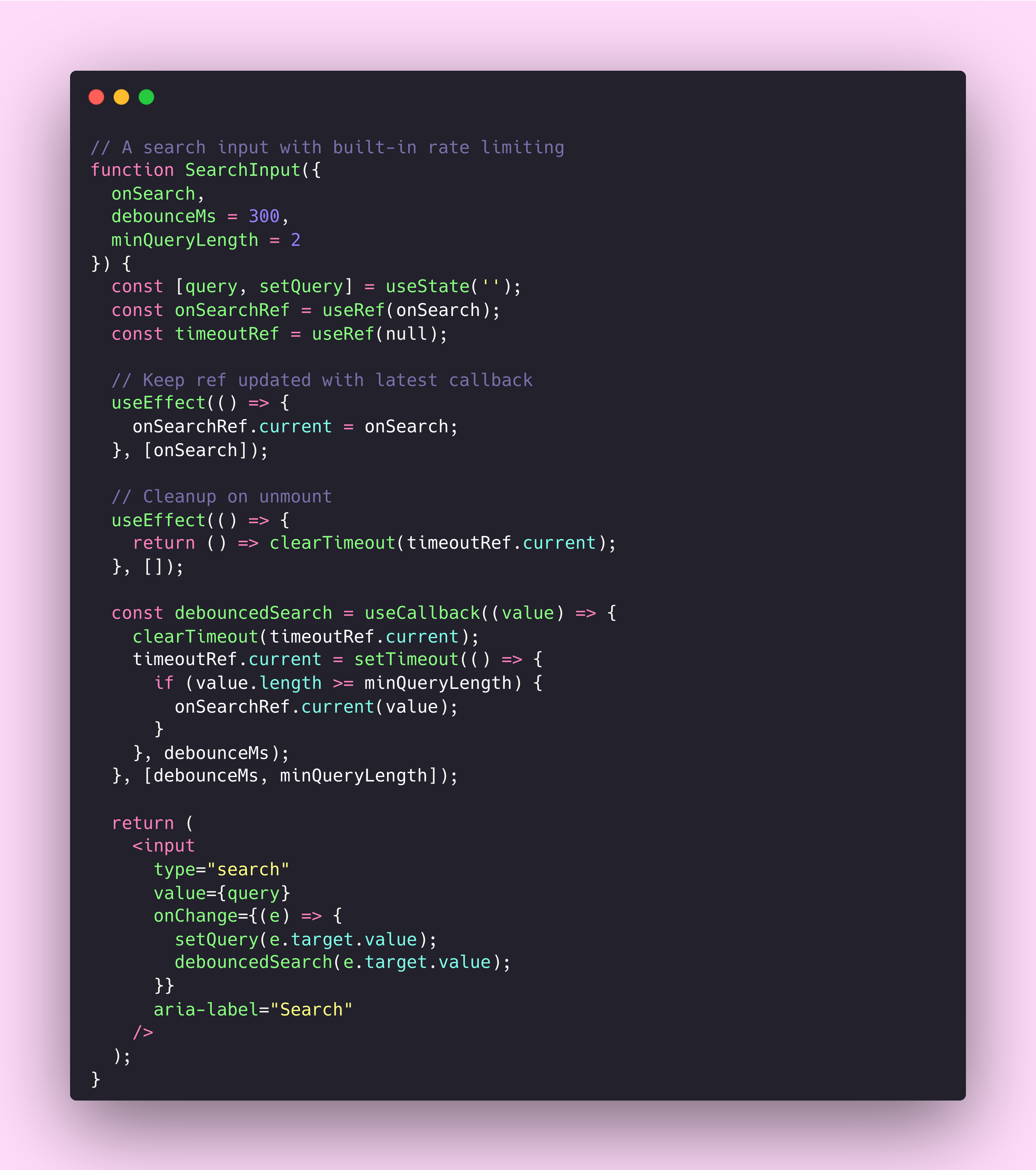
The debounceMs prop makes the rate limiting explicit and configurable. Teams consuming this component understand that search callbacks won’t fire on every keystroke. They can adjust the timing for their specific use case, trading responsiveness for performance as needed.
React’s concurrent rendering features push this even further. Components can now signal that they’re busy, allowing the framework to prioritise more urgent updates. It’s the same idea as the Retry-After header, telling the system “I’m working on something, check back later”.
The documentation gap
Reading through Stripe’s API documentation is a masterclass in technical communication. Every endpoint includes example requests and responses. Error conditions are exhaustively catalogued. Edge cases are addressed explicitly rather than left as surprises.
Most design system documentation doesn’t come close. We document the happy path, show a few prop variations, maybe include an accessibility note. But we rarely document what happens when things go wrong. What does this component do when passed invalid props? What state does it enter during loading? How does it behave when the network is slow or unavailable?
I’ve started treating my component documentation like API reference documentation. Each component gets a section on error states with the possible errors and their meanings. Each gets a section on edge cases covering unusual inputs or conditions. Each gets a versioning section explaining what changed and when.
The Postman blog on REST API best practices emphasises that documentation should be “executable” with examples that match reality. Component documentation should work the same way. If your Storybook examples don’t demonstrate error states and loading conditions, they’re incomplete.
Stealing with intention
The best API documentation in the world has been refined through millions of support tickets, thousands of edge cases, and decades of iteration. When Stripe documents their idempotency implementation, they’re codifying hard-won knowledge about distributed systems and failure modes.
Design systems can benefit from this accumulated wisdom. The question worth asking is what problems these patterns solve and whether our components face similar challenges.
The answer is usually yes. Components are interfaces. APIs are interfaces. The problems of consistency, reliability, backward compatibility, and clear communication exist in both domains. We don’t need to solve them from scratch.
The patterns I keep coming back to
I’ve been keeping a list of patterns I’ve stolen from API documentation over the past year. Each one solved a problem I was struggling with in component architecture, and I keep returning to them as reference material.
I’ve put together a collection of these patterns as code snippets that you can fork and adapt.
This article connects to previous writing on treating design systems as APIs, JSON and design tokens, and the hidden cost of design system entropy. For more on API fundamentals for designers, see Simplifying APIs and Designing with APIs.
Thanks for reading! Subscribe for free to receive new posts directly in your inbox.
This article is also available on Medium, where I share more posts like this. If you’re active there, feel free to follow me for updates.
I’d love to stay connected – join the conversation on X and Bluesky, or connect with me on LinkedIn to talk design systems, digital products, and everything in between. If you found this useful, sharing it with your team or network would mean a lot.
Everything in this article, the structured errors, the explicit contracts, the machine-readable deprecation warnings, is what AI agents need to consume your design system without human interpretation. I’ve been exploring that intersection for a while now, and I put together a quick quiz to help you figure out where your system stands.


Member discussion